Wave analysis: count, length and type of each wave ride
Available for: Wave and Downwind disciplines
Updated on
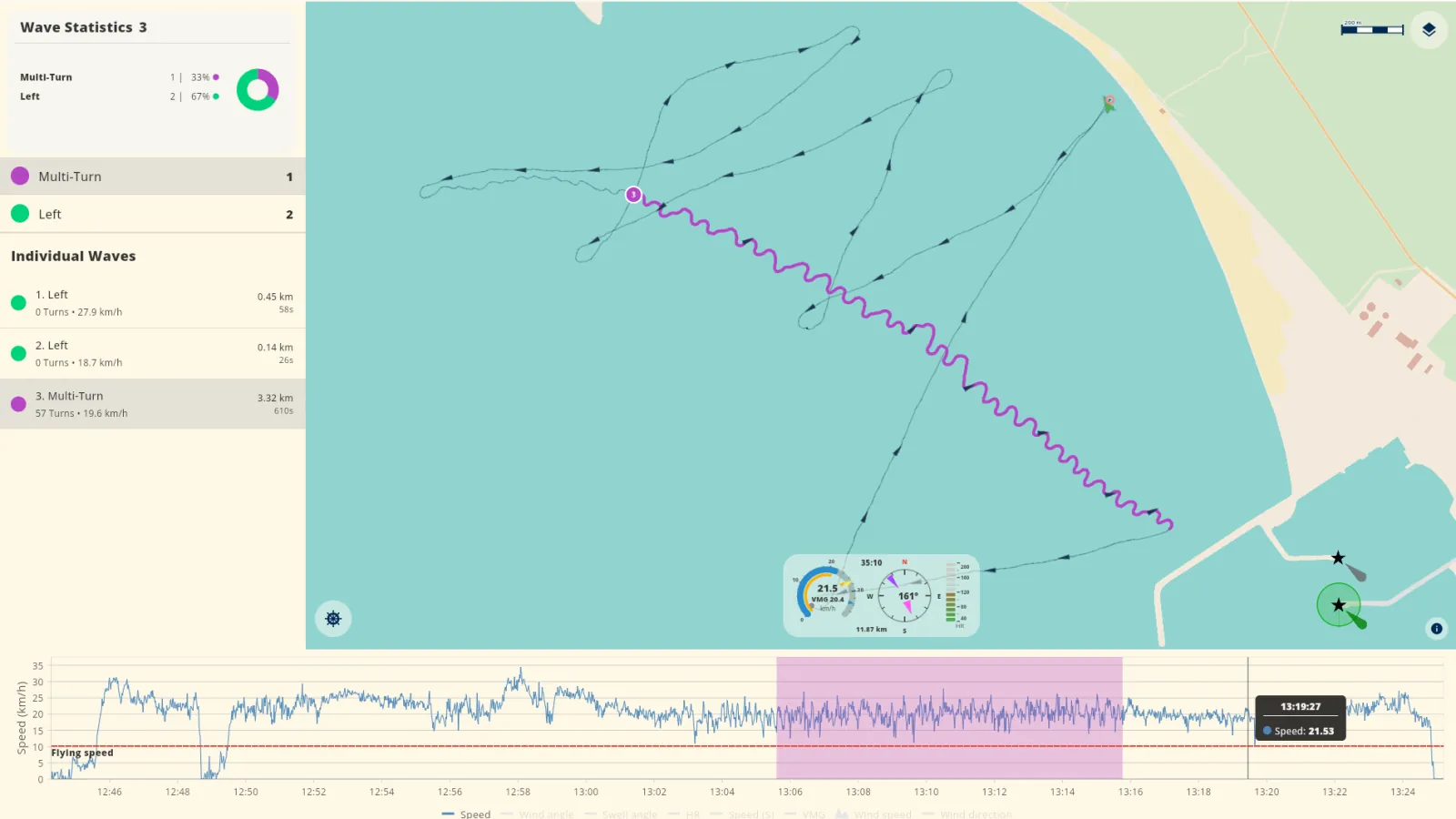
In the Wave and Downwind disciplines, a good session is not only a high top speed. The number of waves and the length of each wave ride are also important. WindSportTracker finds each wave ride in your GPS track. The app measures the time and the distance of each wave ride and gives it a type: right, left, straight or Multi-Turn.
You can select each wave ride. The app then shows this wave ride on the map and in the speed chart. Thus, you can compare two wave rides and see where the speed decreased.
During the 27-day trial, all functions are available. You can do a test of the wave analysis with your sessions before you buy a subscription.


What the wave analysis shows
For each session, the wave analysis shows these values:
- Count: The total number of wave rides and the number of wave rides of each type.
- Time: The time of each wave ride and the total time of each type.
- Distance: The distance of each wave ride, the total distance of each type and the average distance.
- Longest wave ride: The longest wave ride of the session.
- Turns: The number of turns of each wave ride.
- Type: Right, left, straight or Multi-Turn for each wave ride.
The four types of wave ride
The app gives each wave ride one of four types. The type shows how you rode the wave.
- Right: You ride on the right side of the wave, and your course turns gradually to the right. Your track is a smooth curve without turns, almost the same as a small “S”.
- Left: You ride on the left side of the wave, and your course turns gradually to the left.
- Straight: You ride in the same direction as the wave, at the speed of the wave.
- Multi-Turn: You make a sequence of left and right turns, but your general direction is almost straight. This riding style is more active and usually faster than a straight wave ride.
The count and the distance of each type show the style that you use most. For example, you can see if you ride more to the right or more to the left. You can also see how many turns you make on the wave.
Map and speed chart
When you select a wave ride, the app shows its section on the speed-colored map. The speed chart shows the same section second by second. You can zoom the speed chart. Thus, you can see where the wave ride started, where you made turns and where the wave ride stopped.
All results in WindSportTracker use this principle. Thus, it is easy to find the position of each value on the water.
Wave
In the Wave discipline, you ride the waves near the coast. The wave analysis gives answers to these questions:
- How many waves did you ride?
- Which wave rides were the longest?
- Do you ride more to the right or more to the left?
- How many turns do you make on a wave?
The discipline is also a filter for your statistics. Thus, you can examine your Wave sessions independently from your flat-water sessions. You can compare the sessions at the same location and see if your wave rides become longer.
Downwind
In the Downwind discipline, you go downwind, usually from one point on the coast to a different point. Between the start and the end, you ride the waves of the open water.
The app uses the same wave analysis as in the Wave discipline. You get the same values: count, time, distance, type and turns. The longest wave ride and the average distance show how far you ride on one wave. Compare the average distance of different Downwind sessions to see if your wave rides become longer.
When you select a wave ride, the map shows where you rode this wave between the start and the end. The speed chart shows the speed on the wave and the speed before and after the wave ride.
Record and import
The wave analysis is available for all sessions in the Wave and Downwind disciplines. The device that recorded the session is not important.
- iPhone, Android, Apple Watch and Wear OS: These devices record directly with WindSportTracker.
- Garmin, Coros, Suunto and Polar: After you connect the account one time, these watches send new sessions to WindSportTracker automatically.
- Other formats: Imported sessions get the full analysis, which includes the wave analysis.
More information about devices and import is in compatible devices.
Questions and answers
Which types of wave ride does WindSportTracker show?
The app shows four types. Right and left are wave rides on the right side or the left side of the wave, with a smooth curve and no turns. Straight is a wave ride in the same direction as the wave. Multi-Turn is a wave ride with a sequence of left and right turns.
Is the Downwind analysis different from the Wave analysis?
No. The Wave discipline and the Downwind discipline use the same wave analysis. You get the same values for each wave ride: count, time, distance and type.
When is the wave analysis available?
The wave analysis is available only for sessions in the Wave discipline or the Downwind discipline. Sessions in other disciplines do not show wave values.
Can I use the wave analysis with a Garmin, Coros, Suunto or Polar watch?
Yes. After you connect the account, these watches send the sessions to WindSportTracker automatically. The app then does the full analysis, which includes the wave analysis.
Try the wave analysis
During the 27-day trial, you can use the wave analysis with your sessions. After the trial, WindSportTracker costs €2.70 each month or €27 each year when you pay in the web app. The price can be different in other currencies and because of taxes.