Pumpfoil app GPS tracking: starts, foil time, runs
Updated on
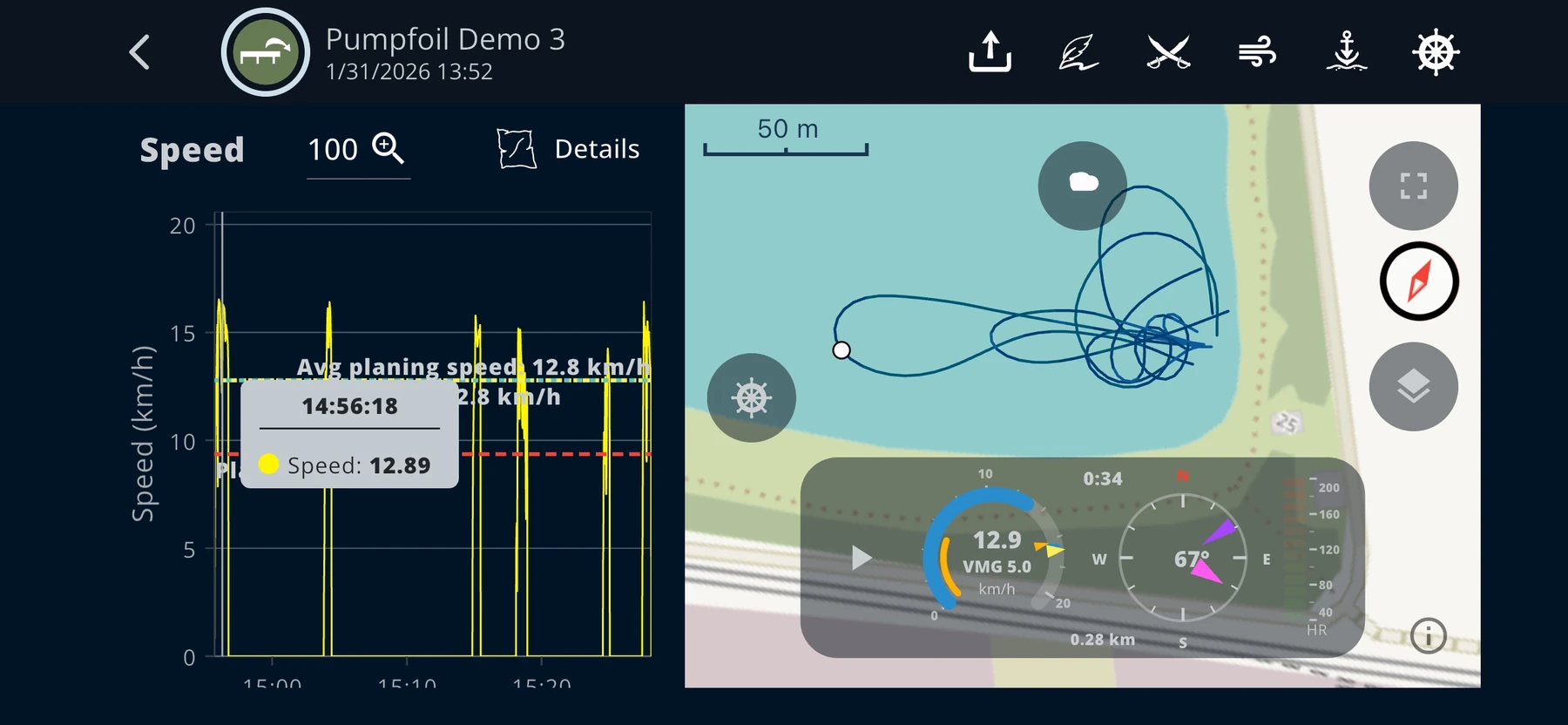
In pump foiling you do not need wind. Something else decides: Do you make the start — and if you do, how long do you stay up? Used as a pumpfoil app, WindSportTracker makes exactly that visible. It shows the runs in which you were really on the foil. Time on the dock and the way back to the start, as long as you are not flying, stay hidden. Foil time counts. From that come the number of runs as well as duration, distance and speed of each run.
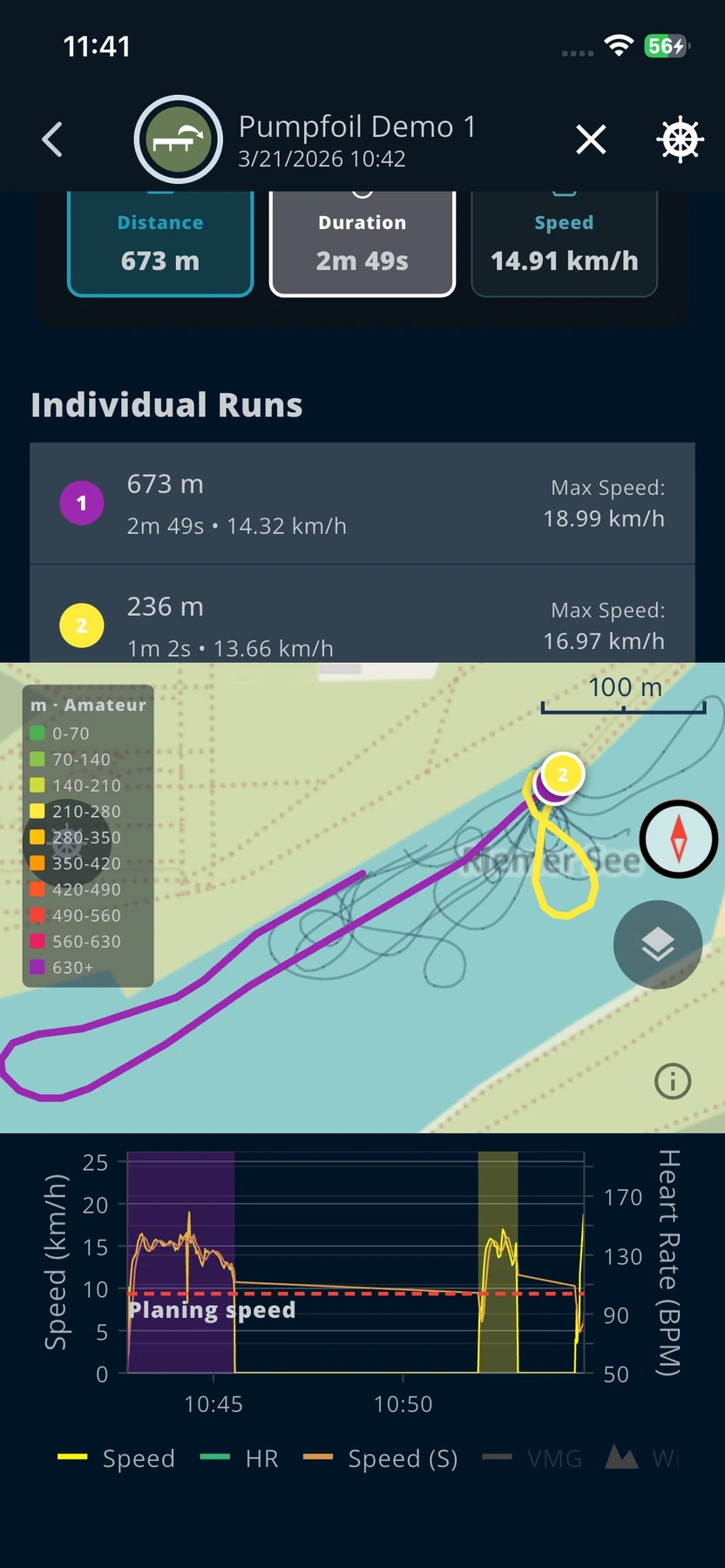
Long pauses belong to the sport. After a flight you often swim back and need power for the next attempt. A session duration of one hour therefore says little. Three held flights of twenty, thirty and fifty metres say more. In WindSportTracker you open every run on the speed-colored map and check it second by second in the zoomable speed chart — instead of a total in which standing time and foil time are mixed.
For recording, an iPhone or Android phone in a waterproof case is enough. Alternatively you record directly with Apple Watch or Wear OS, or you transfer a session from Garmin, Coros, Suunto or Polar. During the 27-day trial the full feature set is available, without you having to enter payment details.




What the pumpfoil app measures
Pump foiling leaves a different trace than wingfoiling. There is no wing that pulls you into flight. You work with your body against the foil. The analysis therefore follows only the phases in which the foil carries. What happens in between — standing on the dock, swimming back, catching your breath — is not the performance you want to compare for pumpfoil statistics.
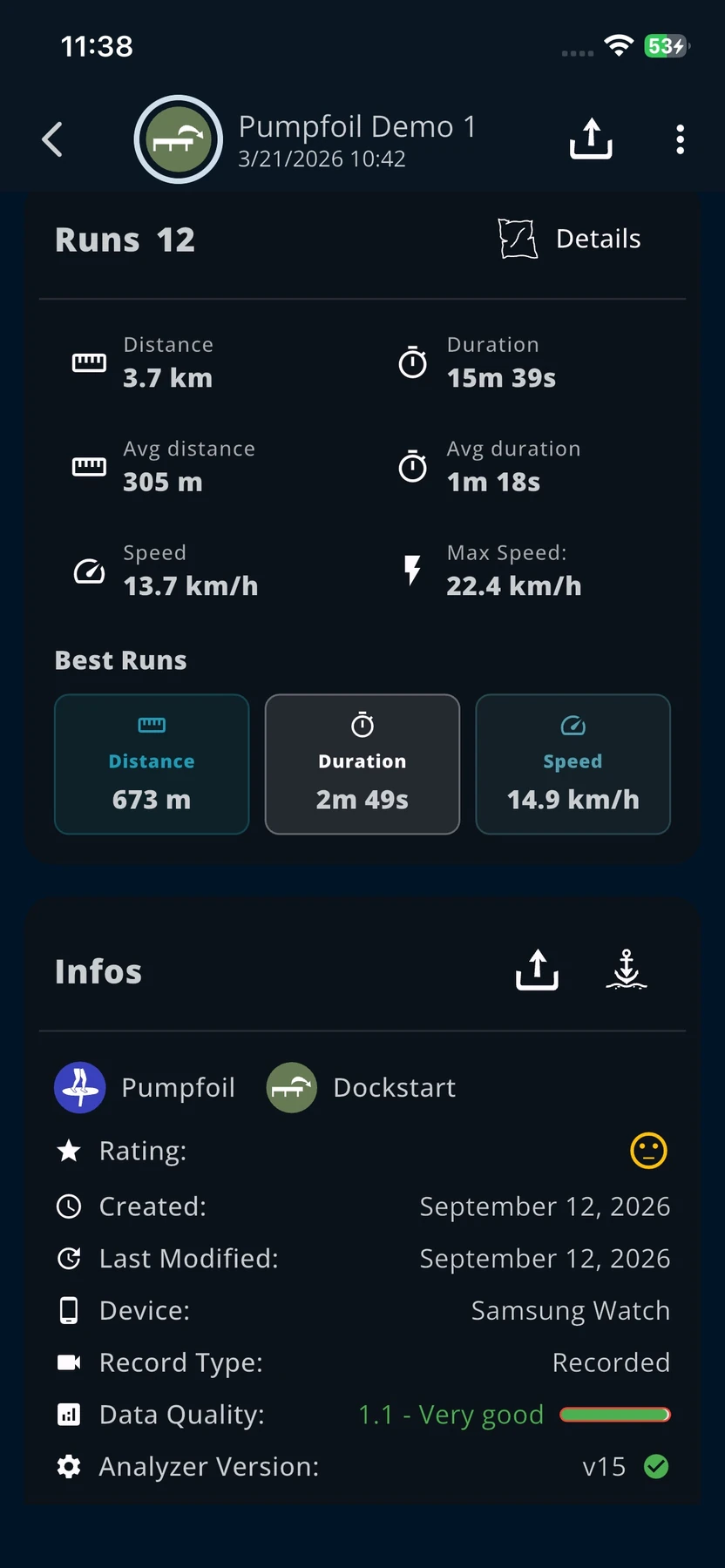
Every metric answers a different question. Foil time says how long you were up. The number of runs says how often a start actually succeeded. Duration, distance and speed of a single run show whether you get further with the setup or drop earlier. The longest flight is the reference run of the session, not a separate trophy with its own breakdown.
Foil time: only the runs count
In pump foiling WindSportTracker measures the time on the foil. The time in between does not matter. Long pauses are normal here: you often have to swim back and gather power for the next attempt. The app therefore hides standing time and the return and shows the runs.
From these runs come the values you train with. You see how many flights the session had, how long each flight lasted, which distance you covered in it, and how speed developed inside it. An hour on the dock with two short flights is a different session from twelve held runs in the same total time. Without that split, only the feeling in your legs remains.
In the speed chart every run sits on the same time axis. You select it and see where the flight began, whether speed stayed even, and where it broke. The session map shows the same section in space: from the pop at the dock along the flight line to the point where the board touches down again. The pause afterwards is not a second run.
Pump as long as you can
Pump foiling is about being able to pump for as long as possible. That costs a lot of power. Whether you work continuously, glide briefly, or still catch a drop: it is the same question — how long do you hold the flight?
With WindSportTracker you compare that on the runs, not on a calendar feeling. A small, fast foil costs more power. A large, slower foil saves power. Despite a lower speed the larger foil can deliver the longer distance because you stay up longer. Conversely the small foil can carry further at a high cadence if you have the power to hold the rhythm. That is exactly what you see when you put duration and distance of the runs next to each other.
You can also read the runs in their order. Were the first flights shorter because you were not warm yet? Were the middle ones the best? Did the last ones break because you were already too tired? That distribution is training information: warm-up, load, fatigue. A single session duration hides it.
In the chart you also see whether you held speed across the whole flight, whether there were peaks, or whether you were about to touch down and still saved the flight. That is not a separate touchdown count. It is the path of the run, which you can check second by second.
Number of starts
WindSportTracker does not count start attempts. It counts successful starts — even if they are short. The number of starts is the number of runs.
That is why it takes a while until the first run appears. If you only jump onto the board, that is not yet a run. You have to jump on and fly at least a few metres. That also works without pumping: first learn to jump on and let the flight sink slowly. Only when that pop is solid does active pumping become the next step.
This threshold helps you set training goals correctly. You master the start before you measure how long you can hold the active flight. Twelve jumps without a flight stay invisible in the statistic. Three short, held flights are three starts. That is uncomfortable, but honest: the app does not reward the intention on the dock, it rewards the flight.
On the map, successful starts typically sit densely at the dock or at the place where you pop. Later, when you practise longer flights, the runs spread further on the water. You see the clusters and can read them together with duration and distance of the same session.
Longest flight
The longest flight in pump foiling is simply the longest flight. There is no breakdown into a pump share and an unpowered share. The value marks the connected segment that stayed up furthest or longest in this session.
You can still analyse the same run. Did you hold speed evenly? Are there peaks where you pumped too hard? Does speed dip briefly because you lost height, and come back afterwards because you saved the flight? Map and speed chart show that path. The longest flight is therefore a reference segment to check, not an isolated record.
Across several sessions this value only becomes meaningful when you keep gear and start method comparable. A flight after a dock start is a different dataset from a flight after a paddle-up start.
Map, replay and speed chart
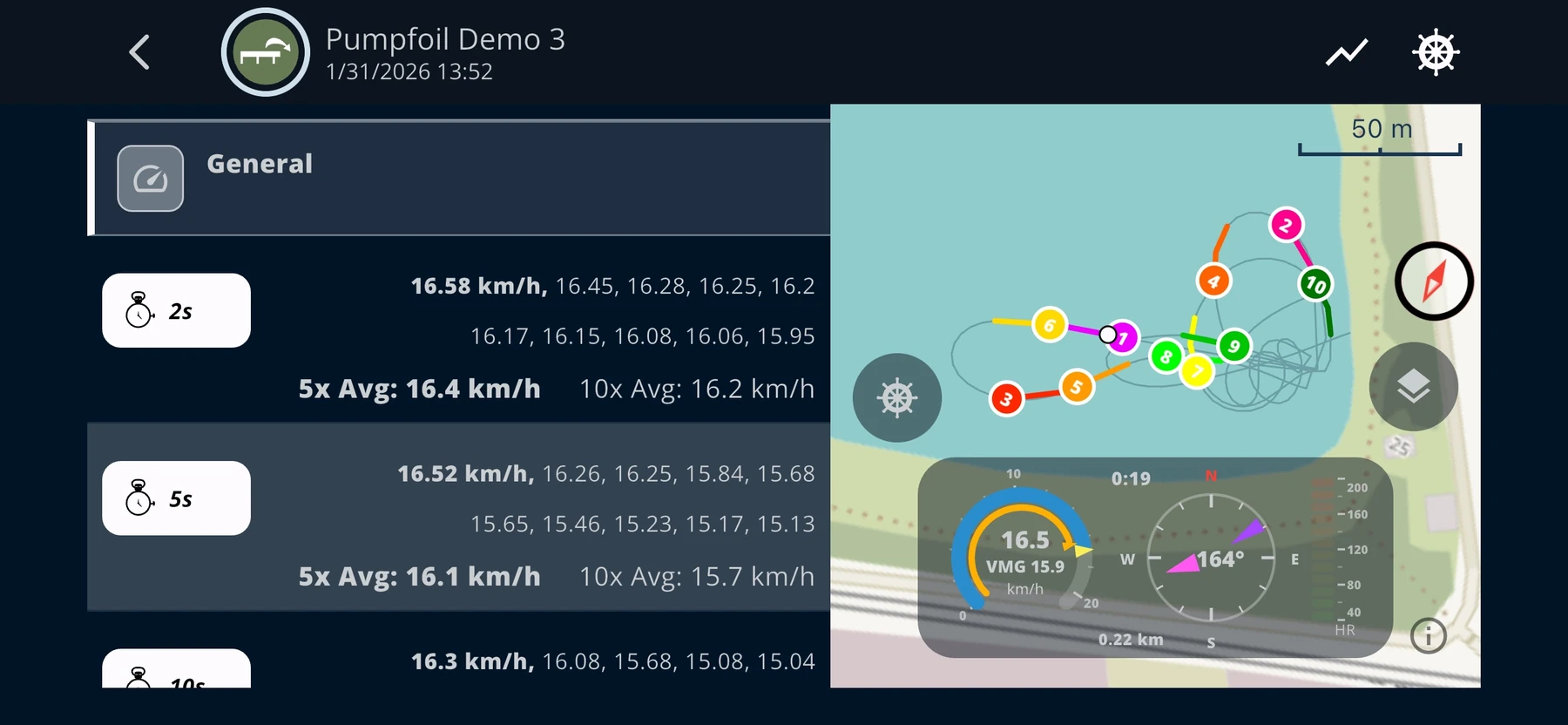
All pumpfoil analyses follow the same principle as in the other sports, only with different questions. The speed-colored session map shows where the run sat. When you select a run, a speed value or the longest flight, WindSportTracker highlights exactly that section. You do not have to guess from a list which flight was meant.
In the replay you follow the line from the start to touchdown. The zoomable speed chart adds the time series to the map. On a short first flight you see the pop, a brief carry and the sink. On a long run you see whether the rhythm stayed even or whether a dip came in the middle of the segment that you still caught.
This analysis principle also applies to supported imports. An imported session receives the same pumpfoil-specific analysis and is not reduced to a simple track display.
Setup guides: Apple Watch and Wear OS. Feature overview on the homepage.
On your watch and with other devices
In pump foiling you often swing your arms hard. A look at the phone during a run is therefore barely possible. After the transfer the track goes through the same pumpfoil analysis, regardless of whether it was recorded directly in WindSportTracker or with another supported device.
Pump foiling is more demanding for GPS than many other watersports. Long rest phases on the dock alternate with a very fast movement after the pop. That raises the chance of data outliers. Devices that can receive two GNSS frequency bands at the same time are therefore recommended. Reception on two bands lowers the chance that a single disturbed sample shifts the start of a run or distorts a short flight.
- Apple Watch and Wear OS: The WindSportTracker app records directly on the watch. During the session, spoken speed feedback and a vibration alert on a new session top speed are available. Details are in the Apple Watch guide and the Wear OS guide.
- iPhone and Android: Both platforms record directly with WindSportTracker. The phone can stay protected in a waterproof case or pocket.
- Garmin, Coros, Suunto and Polar: After a one-time link, new sessions are transferred to WindSportTracker automatically. Guides are in the posts on Garmin, Coros, Suunto and Polar.
- Further files: Supported FIT and TCX files can also be imported and then analysed with the same run and foil-time analysis.
The device choice therefore stays separate from the later analysis. You can record at the dock with the watch and still inspect an older imported session in the same season statistics.
Compare board and foil
In pump foiling the setup is at its core board and foil. The pumpfoil board is very small, usually only 35 litres or even less. The foil decides how long you can glide and at which cadence you can or must pump. The foil includes mast, front wing, fuselage and stabilizer. Each of these components affects lift, pump rhythm and the distance you achieve with a given amount of power.
In WindSportTracker you assign the board and the foil components to a session. As freely defined parts you can capture shims, for example, with which you change the angles of individual wings or of the whole foil. The gear statistics connect the setup with foil time, number of runs, duration, distance and speed. In comparable conditions you see whether the small, fast foil still carries further despite higher power cost, or whether the large, slower foil delivers the better distance through the longer flight time.
You can mark borrowed gear accordingly. Sold components are archived, but stay linked with their earlier sessions and statistics. The development of your setup is therefore not lost just because a front wing or a board no longer belongs to your current equipment.
Long-term analysis
A single session depends strongly on power, water temperature, setup and the chosen start method. Progress therefore becomes reliable only across several sessions. WindSportTracker summarises your development by month, season and year and keeps pumpfoil separate from wingfoiling or windsurfing.
In the long-term view you see whether successful starts become more frequent, whether individual runs last longer, and whether distance or duration grows over the season. Together with the gear assignment you can place time spans and foils, instead of making one especially good evening at the dock the only benchmark.
For beginners the statistic documents the path from the first held jump to repeatable short flights. Advanced riders see whether they can pump longer and whether the last runs of a session no longer break. Experienced riders can compare over the year with which start method they achieved the most distance or duration.
Screenshots from the analysis
The following views come from the app, not from a marketing render. Alt texts describe what you actually see after the session.
GNSS at the dock: 1 Hz even when you stand still
Phones typically deliver 1 Hz GNSS; some watches record at a higher rate. WindSportTracker uses extra samples when the device supplies them. In pump foiling, though, it matters above all that recording keeps running at at least 1 Hz — even when you stand still on the dock.
Only then does the app recognise the start of a new run correctly at the dock. If the device powers the receiver down in the pause and only wakes up when you are already moving, the run in the data often starts only after ten or twenty metres. The pop is missing, the distance of the flight becomes shorter, and the comparison between two attempts becomes unusable.
Therefore make sure in the watch or phone that recording does not save power in rest phases. Continuous recording also matters in other sports. There, though, the GNSS chip stays more likely active because of the constant movement. In pump foiling you probably pause on the dock; exactly then the device must not throttle the measurement. Long standing times and the fast pop afterwards are the combination in which thrifty GPS modes damage the track.
Wet hands, neoprene, waterproof cases and recording with the display off affect the position data as well. WindSportTracker has been developed for more than ten years for GNSS recordings on phones and watches. The pumpfoil analysis has to derive starts and foil time from this track without declaring the pause on the dock as a run.
Dock, boat, paddle-up — same app, different starts
In a paddle-up you start in the water: you stand on the board and accelerate it with the paddle. By paddling and pumping at the same time you finally lift the board out of the water and onto the foil. If a boat pulls you onto the foil, that is wakethief. At the dock you start with a run-up or jump directly onto the board. Independently of the method, WindSportTracker recognises the runs as soon as you are really flying.
You can keep the differences for yourself as different disciplines. An evening with dock starts is then not the same statistic as a paddle-up or wakethief session. At the end of the year you see with which method you achieved the most distance or the longest duration. The app does not mix that into a single pump score.
The voice on the watch does not replace the run list. It tells you in the segment whether speed is breaking right now. Together with the peak vibration on Apple Watch and Wear OS, the feedback stays in the hands that steer the board.
Frequently asked questions
What does WindSportTracker count as a start in pump foiling?
Only successful starts, even if they are short. Jumping onto the board alone is not yet a run. You have to jump on and fly at least a few metres — that also works without pumping. WindSportTracker counts the number of runs. Start attempts and touchdowns are not counted. More notes in the forum FAQs.
Does time on the dock or on the way back count toward foil time?
No. WindSportTracker hides time on the dock and the way back to the start as soon as you are not on the foil. Only the time on the foil counts. Long pauses in between are normal in pump foiling, because you often swim back and gather power.
Can I record pumpfoil sessions without a smartwatch?
Yes. Android and iPhone are enough. A waterproof case and the phone in your pocket work for most sessions. The watch is optional.
Do Garmin, Apple Watch and Wear OS work?
Yes. Apple Watch and Wear OS record directly with WindSportTracker. Garmin, Coros, Suunto and Polar transfer sessions automatically after a link.
Can I compare the board and every component of a foil?
Yes. You can assign board, mast, fuselage, front wing, stabilizer and further freely defined components. Borrowed and archived gear stays analysable in the matching sessions.
Where is the GPS data stored?
On servers in Germany under the rules of the GDPR. WindSportTracker does not share your data with third parties and shows no ads. Support for that is in the forum, not in store chat.
Feature details
- Speed analysis by time, distance and Alpha
- Equipment analysis with statistics for each item
Try WindSportTracker as a pumpfoil app
27 days of full access on Android, iPhone, Apple Watch, Wear OS and on the web. No features locked, no payment details until you decide to continue. After that, when you pay via the web app, it costs €2.70 per month or €27 per year; store prices can differ. The amount can differ in other currencies and because of taxes.
If you also ride with a wing, the matching page is under wingfoiling. For planing on the windsurf board, see windsurfing.