2 second speed in windsurfing: what it is and how GPS measures it

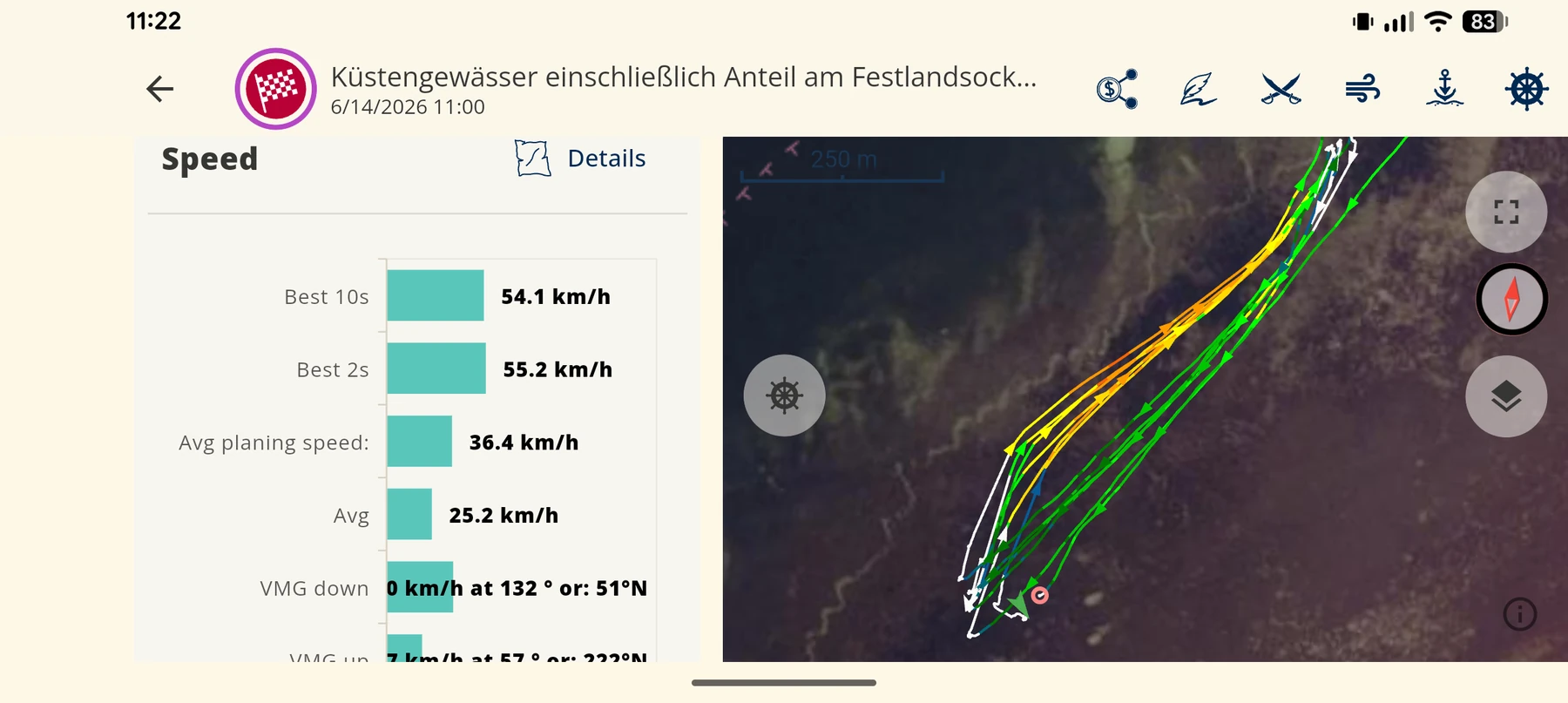
The 2 second speed is the highest average speed that you keep for two seconds in one session. Analysis software calculates it from the GPS track after the session. Windsurfers, wingfoilers and kitesurfers use it as their main peak speed value. GPS-Speedsurfing and the GPS Team Challenge show it as a separate category. A single 1-second value can contain GPS noise. A two-second window gives a more stable value.
This guide explains how software calculates the value. It also explains why two devices can show different results. At the end, you get a checklist for a clean 2 second value. For all speed values in the app, read the speed analysis page.
What does 2 second speed mean?
The value is an average over a time window of two seconds. The software moves this window along the full track. It keeps the window with the highest average speed. The result is your “2 s” or “Max 2 sec” value.
The two large online rankings use different names for the same value:
- GPS-Speedsurfing uses the name “Max (2 sec)”. The basic rules define it as the highest speed that the software calculates.
- GPS Team Challenge (GPSTC) uses the name “2 second peak”. The GPSTC rules list it as one of six categories.
The rules do not give one exact calculation method. Thus, different programs can show slightly different values from the same file.
Why not use the highest 1-second value?
At 1 Hz, one second contains one sample. If this sample has an error, the 1-second value has the same error. One bad sample can make your peak too high.
A two-second window contains more samples. Thus, the effect of one bad sample becomes smaller. This table shows the number of samples in the window:
| Sample rate | Samples in 2 seconds | Typical devices |
|---|---|---|
| 1 Hz | 2 to 3 | Phones, most smartwatches, Locosys GT31 |
| 5 Hz | approximately 10 | Locosys GW52 and GW60 (at 5 Hz), Motion |
| 10 Hz | approximately 20 | Motion (at 10 Hz) |
A higher sample rate does not automatically give a more accurate value. The quality of each sample is also important. Satellite reception, antenna position and the speed method have an effect on this quality.
Doppler speed or position speed: which is more accurate?
A GNSS receiver can calculate speed with two methods. Inside GNSS describes both methods:
- Position speed: The receiver compares two positions. It divides the distance by the time. The accuracy is in the range of metres per second.
- Doppler speed: The receiver measures the frequency shift of the satellite signals. The accuracy is in the range of a few centimetres per second.
For a short window of 2 seconds, this difference is important. Thus, both rankings ask for Doppler speed. The GPSTC rules say that speeds must be Doppler. The GPS-Speedsurfing rules tell you to use the Doppler function when the software has it.
Some files contain only positions. Then the software must calculate speed from the positions. The 2 s value from such a file can be less accurate.
Which rules apply in the rankings?
If you want an entry in a ranking, the device and the file are important. The two rankings have these rules:
- GPS-Speedsurfing has filters for verified devices: maximum acceleration 5 m/s², maximum HDoP 5, minimum 5 satellites.
- A valid run has no spikes and no unusual acceleration. You can delete a spike at the end of a run if a crash caused it.
- Only one best value per run counts. A new run starts after a jibe, a tack or a stop.
- GPSTC approves specific devices, for example Motion, Locosys GW-60, GW-52 and GT-31.
- GPSTC tells you to set the GW-60 to 5 Hz. Do not use “Smart Logging” on the GW-52 and the GW-60.
The list of verified watches on GPS-Speedsurfing changes over time. Our Locosys guide and our COROS guide give more details.
How do 2 s, 10 s and 500 m values differ?
The 2 s value shows your peak in one gust. Longer values show how long you can keep a high speed. Use the values together to understand a session.
| Metric | What it shows | Ranking category |
|---|---|---|
| 2 s | Peak speed in one gust | GPS-Speedsurfing “Max (2 sec)”, GPSTC “2 second peak” |
| 10 s | Speed that you keep on a short run | Both rankings use the average of 5 runs (5 × 10 s) |
| 500 m | Speed that you keep on a long run | GPS-Speedsurfing “500m” |
| Nautical mile | Speed over 1852 m, with turns | Both rankings |
| Alpha | Speed over 500 m with a jibe, start and end near each other | GPS-Speedsurfing “Alpha racing”, GPSTC “Alpha Racing 500m” |
| 1 hour | Average speed over 3600 seconds | Both rankings |
A high 2 s value with a low 10 s value often shows a short gust. A small difference between the two values shows that you keep your speed.
How do you get a clean 2 second value?
Do these steps before and after the session:
- Use a device that records Doppler speed.
- Set the sample rate to 5 Hz if your device has this option.
- Start the device on land.
- Wait for a GPS lock before your first run.
- Keep the antenna above the water.
- Do not put the device under thick neoprene.
- After the session, open the speed chart at your peak.
- Examine the samples near your peak. A single high sample can be an error.
- Compare the 2 s value with the 10 s value of the same run.
- For a ranking entry, upload the original file. Do not post a screen result.
Why do two apps show different 2 second values?
The same session can give different values in different apps. These are the usual causes:
- Speed source: One app uses Doppler speed. The other app calculates speed from positions.
- Sample rate: A 1 Hz track has fewer samples in the window than a 5 Hz track.
- Filters: Each app has its own limits for spikes and acceleration.
- Window method: The rules do not define one method. Each program has its own method.
- Track edits: You can cut the track or delete a spike. This changes the result.
How to measure your 2 second speed with WindSportTracker
WindSportTracker shows the 2 s value as the smoothed top speed of a session. The algorithm also removes implausible GPS outliers. Thus, a random single sample does not become your record.
The app shows more speed values next to the 2 s value:
- 5 s and 10 s
- Distances from 100 m to one nautical mile
- 1 hour
- The best 10 runs for each time and distance interval
- Alpha 250 with a jibe
You can open each run on the map and in the speed chart. The chart can zoom to single seconds. Use this zoom to examine your peak.
During the session, the phone and watch apps tell you your speed with a voice. On Apple Watch and Wear OS, the watch also vibrates at a new session top speed.
For a 5 Hz track, import the file from your logger. WindSportTracker imports SBN and SBP files from Locosys GT11, GT31, GW52 and GW60. It also imports OAO (Motion), GPY (ESP32), FIT and GPX files. The app uses the extra samples when the device supplies them.
The 2 s value in the app is for your own analysis. A record entry on GPS-Speedsurfing or GPSTC needs an approved device and the rules of that ranking. All devices are on the compatible devices page.
Frequently asked questions
Is the 2 second speed the same as the top speed on my watch? Not always. A watch display can show a single sample. The 2 s value is an average over a two-second window. Software calculates it after the session.
Can a phone at 1 Hz give a correct 2 second speed? For your own analysis, yes. At 1 Hz the window contains only 2 or 3 samples. Thus, one bad sample has a larger effect. For a ranking entry, use an approved device.
Why is my GPS-Speedsurfing value different from my app? The programs use different methods and filters. One program can use Doppler speed and the other program positions. Small differences are therefore normal.
Does 10 Hz give a better 2 second value than 5 Hz? Not automatically. GPSTC accepts Motion at 5 Hz and at 10 Hz. Signal quality and antenna position are also important.
Does WindSportTracker show the 2 second speed for wingfoil sessions? Yes. The wingfoil analysis uses the same time and distance intervals as the windsurf analysis. This includes the 2 s and the 10 s value.
Measure your next peak
Record your next session and examine your 2 s peak second by second. WindSportTracker is free for 27 days, with all analyses.