Locosys GW60: SBN and SBP import for speedsurfing

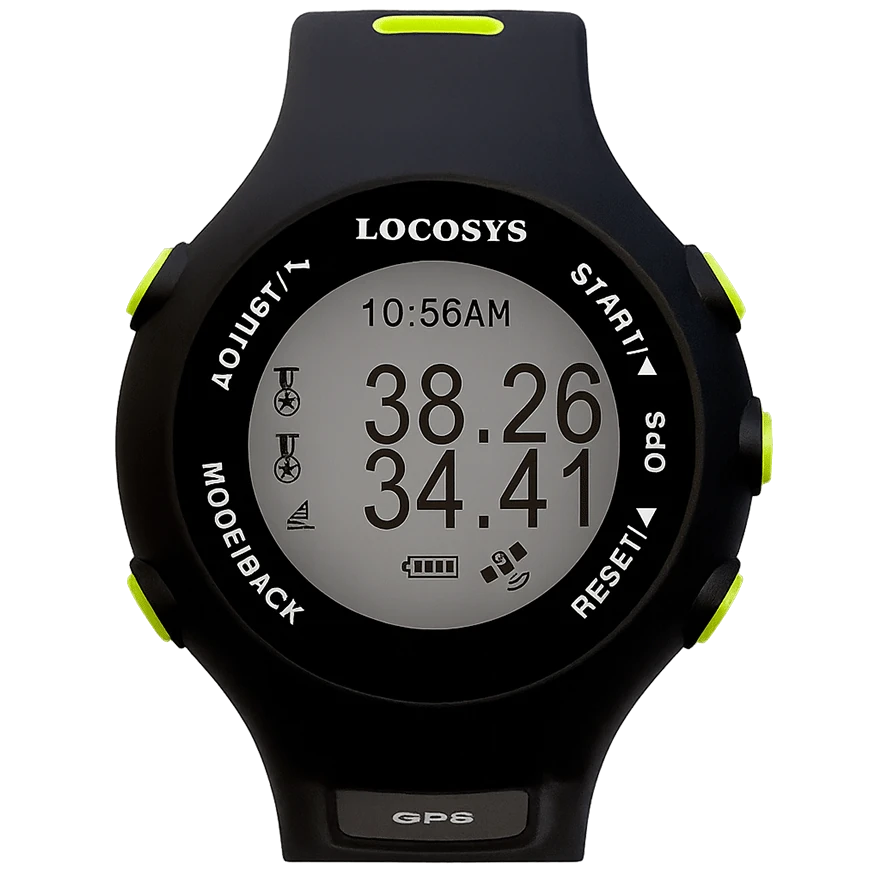
Locosys devices are not smartwatches. GT11, GT31, GW52 and GW60 are GPS loggers from speedsurfing: high sample rate, their own display, a file after the session. Anyone who takes 100-metre and 500-metre runs seriously often lands here — not on a fitness watch.
WindSportTracker imports SBN and SBP directly. The same speed and maneuver analysis as a Garmin or phone session, on the logger track. No auto-sync account: file off the device, then import. 27-day trial, servers in Germany.
All devices including watches: compatible devices. Sport pages: windsurfing, wingfoiling.
Models
| Device | Typical role | Import |
|---|---|---|
| GT11 | Older speed logger, still in many bags | SBN / SBP |
| GT31 | Long-time speedsurfing standard | SBN / SBP |
| GW52 | Newer logger generation | SBN / SBP |
| GW60 | Current cover model, display on the unit | SBN / SBP |
Setup path (file, no account sync)
- Start the session on the Locosys before the first run counts. GPS lock on land or on the beach, not only in the run.
- After the session, take the file off the device (USB, maker-typical folder — SBN or SBP depending on model).
- Open WindSportTracker → Import → choose the file. Web: app.windsporttracker.com.
- Set the sport (usually windsurfing at a speed spot). Trim the track at both ends if needed — approach to the run, cooldown to the car park. The cut is non-destructive.
- Check speed runs, maneuvers and the map. Assign gear if you compare setups.
There is no Locosys cloud pairing in WindSportTracker. One file can contain sessions from several days. If you import that one file, all sessions from it arrive in the logbook.
If you had several sessions on one day, you set in Settings how long the pause between them must be at least so they arrive as separate sessions of the same day. You reach Settings via the gear at the top right — depending on the view it sits there directly or behind the three-dot menu.
If you upload a whole week’s file, analysis takes noticeably longer. That is normal: more track, more sessions.
After a successful import you delete the data on the device. If they stay on the Locosys, the same sessions sit in the next file — and you import them twice.
On-water display
GW60 and the other models show Locosys speed on the unit: current speed, often peak and logger status. That is the display speedsurfers buy the logger for. It is not WindSportTracker live — no maneuver detection during the ride.
The app comes after: best 10 runs over distance and time windows, Alpha 250 m, jibes if the session contains them.
Battery and logger practice
Locosys devices last a very long time. There is nothing to set for saving battery — no display brightness, no power-save modes. A speed day with pauses between runs is what the logger is built for.
Unlike a Fenix you often wear the logger in a pocket, on the arm or on the board setup. The antenna must not disappear under thick wetsuit or under the waterline.
Known limit versus a watch: no auto-sync if you leave the file on the laptop. The session exists in WindSportTracker only after import.
Known limits
- No auto-sync, no Polar/Garmin account. File only.
- No native WindSportTracker on the logger display.
- Wrong sport (wingfoil flight metrics on a speed fin track) twists the numbers. Speed spot → windsurfing.
- Wet USB ports and aborted transfers: check the file before you wipe the logger.
What import delivers
- Speed: 2 s, 5 s, 10 s, 100 m / 250 m / 500 m windows, Alpha 250 m
- Maneuvers when the session contains turns — at a pure speed spot often less relevant than the run list
- Planing phases on fin tracks
- Gear comparison across several logger days
- The same formats beside Locosys: GPX, FIT, plus OAO (Motion), GPY (ESP32), VKX (Vakaros) if you mix hardware
Wingfoil on Locosys is uncommon, technically the same import. You switch the metric language in the app.
Why Locosys counts in rankings
GPS-Speedsurfing sorts sessions into two classes: verified devices count for record entries, everything else lands in the fun ranking. GW-60, GW-52 and GT-31 are on the verified list — which is why the logger has survived for years, even though every outdoor watch now has GPS. Among watches, only a handful of models make the same list.
For your own analysis none of this matters: WindSportTracker computes the same windows from any clean track. But if you want an entry in an official ranking, you ride the logger — and analyse the file here afterwards, instead of settling for a bare list of best runs.
Logger or watch?
Locosys when the speed run is the question: high sample rate, SBN/SBP, file after the spot. A fitness watch with auto-sync when you record everyday windsurf and wingfoil sessions and do not want a USB ritual: Garmin, Coros, Suunto, Polar (auto-sync included).
A live display in WindSportTracker during the ride exists on Apple Watch and Wear OS — not on the Locosys.
Frequently asked questions
SBN or SBP — which format do I have to pick? Neither extra. You take the file the Locosys writes. WindSportTracker imports SBN and SBP from GT11, GT31, GW52 and GW60.
One file contains several days. What happens on import? All sessions in the file come along. A week file takes longer to analyse. After import delete the data on the device — otherwise the same sessions sit in the next file and you import twice.
Several sessions on the same day — how does the app split them? In Settings (gear at the top right, possibly behind the three-dot menu) you set the minimum pause. If the pause between them is long enough, the sessions of the same day import separately.
Does import replace GPS speed software on the PC? WindSportTracker analyses the session: runs, map, maneuvers, gear. Specialist tools only for record lists you can keep using in parallel.
Can I still cut the track after import? Yes. The cut is non-destructive — you can undo it at any time.
What does Locosys import cost? 27 days including Locosys import, then €2.70 per month or €27 per year when you pay via the web app. The amount can differ in other currencies and because of taxes.